Prince of Persia 2 Download for PC

PRINCE OF PERSIA 2: THE SHADOW AND THE FLAME


Prince of Persia 2: The Shadow and the Flame is a platform game released by Broderbund in 1993 as the sequel to 1989's Prince of Persia You can download this here too. Both games were designed by Jordan Mechner, but unlike the original, he did not program the sequel himself.

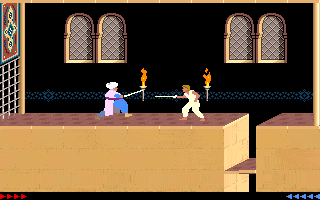
Similar to the first Prince of Persia, the character explores various deadly areas by running, jumping, crawling, avoiding traps, solving puzzles and drinking magic potions. Prince of Persia 2 is more combat-heavy than its predecessor. 

The Shadow and the Flame

In the first game, enemies appear only occasionally and are always alone, while in the sequel, up to four enemies may appear at once, sometimes flanking the player, and may even be instantly replaced by reinforcements when they are killed. 

As in Prince of Persia, the trick is to complete the game under a strict time limit from 75 minutes (which start after a certain point in game) that passes in real time. Lives are unlimited, but time cannot be regained (except by reverting to a previously saved game). 
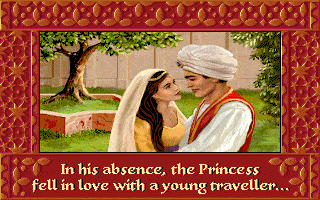

In other areas, more significant improvements have been made. The graphics are far more complex than the simple look of the game's predecessor, the areas explored are larger, and the variety of backdrops is greater.


How to play Prince of Persia 2 : The Shadow and the Flame

Create a new folder for the game 'e.g. C:OLDGAMES'
Extract the game files to the new game folder.

Open DOSBox by running DOSBox.exe.(you can download DOSBox from here)

In DOSBox type ‘mount c c:\OLDGAMES’ and press ENTER
Type ‘C:’ and press ENTER followed by ‘CD PRINCE2’ and ENTER.

Later versions allow you to set sound options. To do so:

Type ‘SETUP’ and then press ENTER
Choose the sound options and exit back to the DOSBox.


To start the game type ‘PRINCE’ and press ENTER.

Prince of Persia 2

Download for Windows  Download for Linux
All 64-bit version program is recommended for most computers. 
Older machines with less than 2GB of RAM may only be compatible with the 32-bit version. 


 Install instruction: 

 > UnZIP with 7-Zip or WinRAR. You can just download 7-Zip from click this link.  
 > UnZip password : vsourc.blogspot.com
 > Please read readme.txt file for game play instraction. 

Prince of Persia pc games Download

PRINCE OF PERSIA PC GAMES


Prince of Persia game was created by Jordan Mechner and published by Broderbund Software. One of the best soundtracks that are embedded in my mind. It was written by Jordan's dad, Francis, and the Adlib version sounds mesmerizing. Jordan had his brother wear white, walk and jump, in order to create the character. He drew each frame of the protagonist and using rotoscopy he achieved the animations of movement that for the time were amazing.
prince of persia pc games


Prince of Persia was released in 1989 on the Apple II and received critical acclaim followed by commercial success when released in Japan the following year. The fluid character animations, considered cutting edge at the time, were based on videos of the game designer's brother performing stunts as well as action sequences from classic films.


The plot, influenced by the Arabian Nights tales, revolves around the eponymous Prince who has been imprisoned by the evil Grand Vizier Jaffar. He has one hour to escape the dungeon and rescue the Sultan's daughter who has been placed under a curse by Jaffar and given a choice to marry him or die!


A side scrolling action game, gameplay consists of navigating Jaffar's dungeons and later his tower by running, climbing and avoiding traps (along with Jaffar's guards). As the game progresses, the Prince will also be hindered by his own doppelganger, conjured up by Jaffar to thwart him.


Although simple by today's standards, it's still very playable, the gameplay has inspired many future cinematic action platformers such as Flashback. A sequel Prince of Persia 2: The Shadow of the Flame can be download from the link.


How to play Prince of Persia

Create a new folder for the game 'e.g. C:OLDGAMES'
Extract the game files to the new game folder.

Open DOSBox by running DOSBox.exe.(you can download DOSBox from here)

In DOSBox type ‘mount c c:\OLDGAMES’ and press ENTER
Type ‘C:’ and press ENTER followed by ‘CD PRINCE’ and ENTER.

Later versions allow you to set sound options. To do so:

Type ‘SETUP’ and then press ENTER
Choose the sound options and exit back to the DOSBox.

To start the game type ‘PRINCE’ and press ENTER.


Prince of Persia

Download for Windows  Download for Linux
All 64-bit version program is recommended for most computers. 
Older machines with less than 2GB of RAM may only be compatible with the 32-bit version. 


 Install instruction: 

 > UnZIP with 7-Zip or WinRAR. You can just download 7-Zip from click this link.  
 > UnZip password : vsourc.blogspot.com
 > Please read readme.txt file for game play instraction.